
TiVo Repair and Troubleshooting Guide: Problems and Solutions Problems using the second
satellite input
A common complaint we hear from customers is that the second SAT
input on the back of their DirecTV TiVo doesn't work. In well more
than 95% of cases, in units that we receive back, the problem isn't
with the TiVo. Here are some things to check:
Please check these issues:
1. As with all TiVo problems, the first thing to try is to unplug
the TiVo, wait 30 seconds, and plug it back in.
2. If rebooting doesn't work, switch the SAT 1 and SAT 2 input
cables and see if the problem follows the cables or the SAT inputs.
If the problem moves to SAT 1 (or from SAT 1 to SAT 2), then the
problem is with either your wiring, your multiswitch, or your dish.
Please note that you cannot simply split the cable with a simple
splitter and connect one end to each input - this is a digital signal
and splitting it won't work. Also, a multiswitch need two runs directly
from the dish to multiswitch, so if you are using a multiswitch,
be sure that you have two "home runs."
3. The next most likely problem is that the unit hasn't been properly
configured for SAT 2. You need to redo Satellite Setup.
Go here:
TiVo Central
-> (Read New) Messages & Setup
-> Recorder & Phone Setup
-> Satellite Dish Setup
-> Repeat Satellite Dish Guided Setup
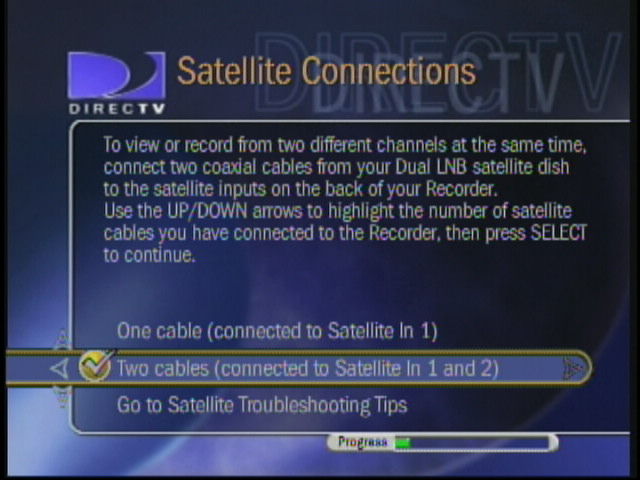
Then, in satellite setup, choose TWO CABLES (as
in the picture below).

Finish the setup and your second satellite input should work properly.

|