
HR10-250 DirecTV HD TiVo Repair and Troubleshooting Guide
Now that DirecTV has stopped manufacturing the HR10-250 HD TiVo, our customers are looking for ways to keep their units up and running. While these units have been very solid performers, with many are over three years old, some are beginning to exhibit problems.
This guide covers some general TiVo problems, and problems specific to this model unit.
No Video Output
No Lights on the Front |
If you apply power to your unit and get no lights on the front and no video out of the video connectors, then you likely have a bad power supply. You should definitely try a different power outlet first, just to be sure, but if that doesn't change the situation, your power supply is most likely malfunctioning. At times, you may have a spinning fan in this situation.
New HR10 Power Supplies |
No Video Output
With Lights on the Front |
There are a few reasons why this situation can occur.
-Most often, the "format" is set on the unit to a format incompatible with the connected TV. Try toggling through the formats with the button on the front faceplate.
-If you have multiple video outputs connected, in most cases, the TiVo will only deliver video to one. You may be attempting to view through an output that has been superceded by another connection.
-HR10s have been know for HDMI issues. See the section that covers HDMI problems with HR10-250s. |
HDMI Output Problems
No Video Out via HDMI
Posterized/Solarized Video Out via HDMI
(generally, fewer colors outputting) |
HR10-250s originally had HDMI cards that experienced a reasonably high failure rate. The assembly was revised and the card was changed, and the problems lessened significantly. The new card can't be used in the old motherboard, but we have remanufactured old-style cards that work solidly, and we have replacement new design cards also.
Replacement HDMI cards for HR10 |
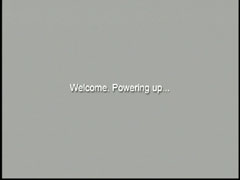
Gray screen
"Welcome Powering Up"
or
Rebooting between this and the "Almost There" screen

|
Proceeding to this screen and no further, or rebooting to this screen almost always means that the hard drive is failing. A replace kit for the HR10 should get the TiVo up and running again. The replace kit does not need to be the same size at what you currently have in the unit.
HR10-250 TiVo Replace Kits
If you currently have two drives in the unit, we recommend removing and replacing both drives. You could test each drive and potentially reuse an older drive with a newer one (or alone) but generally the environment that caused the failure in one drive may have caused latent damage to the other drive. Also, if both drives fail testing, time and money are lost on the testing. You can, of course, replace two drives with one drive. |
| Overheating Warning Screen |
This screen can be a bit deceiving.
If the TiVo shows the overheating screen after it has been running for several hours, then the problem probably is too much heat. This can be caused by a failing fan or not enough ventilation around the unit.
HR10-250 Replacement Fans
If you let the machine cool for a while, then reboot and get this screen within two minutes, then probably the problem has nothing to do with excess heat. There are two situations that can cause this message in this situation:
-Bad HDMI card: If you are using the HDMI output on the HR10-250, try using a different type of video output. In some cases, this resolves the issue, and then replacing the HDMI card will solve the problem. Cards are here.
-If you aren't using HDMI, or the problem isn't solved by switching to another video output path, then you likely have a problematic power supply.
Replacement HR10-250 Power Supply |
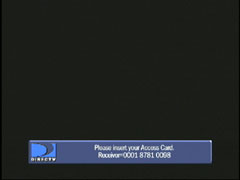
Please Insert your Access Card

|
This can be, surprise, that your access card isn't inserted. Or that it's not fully in. Or that it just needs a wipe on the contacts.
But this can also be a bad power supply. If the card is known working, or has been replaced and you have the same symptom, then a new power supply should fix your problem.
Replacement HR10-250 Power Supply |
For support questions, please email
us.

|