Troubleshooting: Black or Blue Screen on TiVo TCD140060 TCD 140060 - All Lights On Front Are Lit
There is a known problem with the TiVo TCD140060 and TiVo TCD130040. The problem
affects only some units, and becomes more common as the units get older. This
page will help you diagnose and repair the problem.
UNITS AFFECTED: TCD 140060 and TCD 130040
PROBLEM: There are two symptoms of the problem--in most cases, both of these symptoms are present:
1) Your TCD140060 or TCD130040 TiVo DVR displays no picture when it is powered
on. If you are connecting from the TiVo to the TV using a coaxial cable (round
screw-on connector that requires the TV to be set on Channel 3 or 4), then you
would see a black or dark gray screen as soon as you plug in the unit. If you
are connecting from the TiVo to the TV using red/white/yellow composite cables,
you will likely see a blue screen or whatever screen your TV produces when it
has no video.
2) If you look at the front of your TiVo DVR, you will see that all of the
lights are lit, and remain lit. (While this symptom is generally present with this condition, sometimes, no lights at all are on. In this situation, a replacement power supply almost always fixes the problem also.)
RECOMMENDED SOLUTION: A new power supply. Please
see our TiVo power supply page for
product information. Please see this
link for more detailed information.
Power Supply Installation Instructions:
1) Pull the plug from your TiVo and wait 5 minutes for it to discharge.
2) Open the TiVo and remove the drive bracket. Follow steps 1 and
2 in these
instructions.
3) Remove the Power Supply:
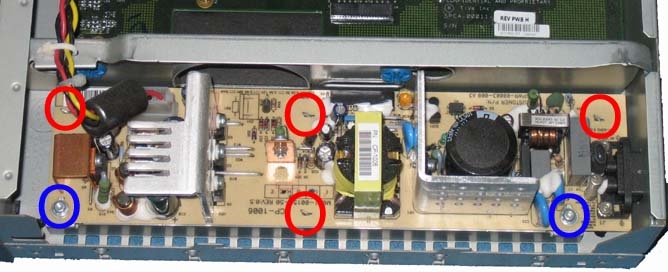
(a) Use a Torx T10 screwdriver to remove the two (2) screws holding
the power supply to the TiVo chassis (see blue circles in Figure
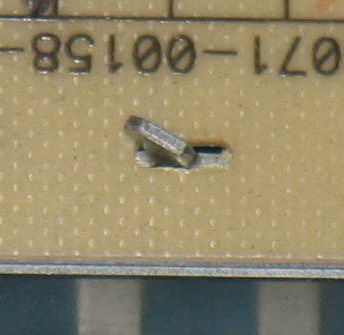
1). Use needle-nosed pliers to straighten the four (4) pins holding
the power supply in place (see red circles in Figure 1 and the closeup
of the tab in Figure 2).
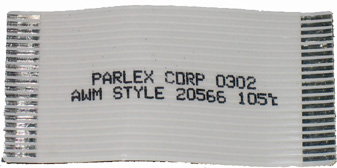
(b) Then remove the flat white cable from the power supply (just
pull the cable away from the power supply to remove it from the
power supply connector). See Figure 3 for a picture of the cable
after it has been removed.
(c) Next, clip the white cable tie holding the drive power cable
in place (the cable tie is shown in the upper left corner of Figure
1 below).
(d) Then slide the power supply toward the front of the TiVo and
up and out of the TiVo.

Figure 1

Figure 2
|

Figure 3 |
4) Install the Replacement Power Supply: Reverse the
instructions above to install the new power supply. Do not forget
to re-connect the white ribbon cable and the hard drive power cable
to the new power supply. Although your replacement power supply
comes with a new drive cable, in nearly all cases, you can use the
cable that came with your TiVo.
5) Reconnect the drive bracket and close the TiVo.
Follow steps 6 and 7 in these
instructions.
For support questions, please email
us.

|