WeaKnees Banner WeaKnees TiVo Upgrade Kits
WeaKnees Banner


Note: This remote also works with HR20, HR21, HR21 Pro, HR22, HR23, HR24, and HR34 HD DVRs

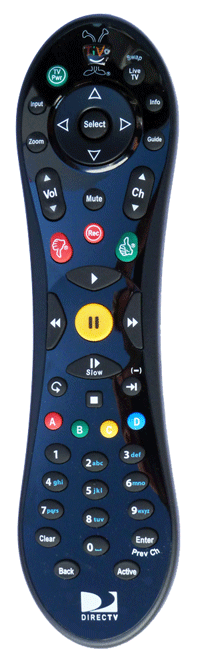
THR22 Remote

Programming this remote to work with your TV or Receiver

If you purchased this TiVo Peanut remote to work with a non-TiVo DVR, you need the information on this page to be able to program the remote to control your TV and AV receiver.

This TiVo remote is able to control:

  • On a TV: Volume, Mute, and Power
  • On an AV Receiver: Volume and Mute
  • On a TV: TV Input

First, you'll need the code(s) to try for your brand of equipment. Consult our list of codes by brand.

Then, follow this information on how to enter the code for each of the above settings. If you have several codes, you'll need to enter the first code using these instructions, test the feature you are trying to set, and, if the code doesn't make the feature work, try the instructions again with the next code in the list.

Setting a TV for Volume, Mute, and Power

Find your TV's code from our TiVo remote TV code list.

Hold down the TV Power and TiVo buttons together, until the red light comes on solid (about 5 seconds). Then release both buttons.

Enter the first four-digit code from your list.

Try your TV Power button. If you get no response, try again with the next code on your list.

Setting an AV Receiver for Volume and Mute

Find your TV's code from our TiVo remote AV code list.

Hold down the Mute and TiVo buttons together, until the red light comes on solid (about 5 seconds). Then release both buttons.

Enter the first four-digit code from your list.

Try your Mute button. If you get no response, try again with the next code on your list.

Setting a TV for TV Input

Find your TV's code from our TiVo remote TV code list.

Hold down the TV Input and TiVo buttons together, until the red light comes on solid (about 5 seconds). Then release both buttons.

Enter the first four-digit code from your list.

Try your TV Input button. If you get no response, try again with the next code on your list.


Top

WeaKnees.com is
not affiliated with
TiVo Inc. TiVo is
a registered trademark
of TiVo Inc.


Payment Methods

All orders are eligible for FREE shipping! We use UPS and USPS (free ground shipping in 48 states - full shipping info).

Questions? Send an email or try our chat during business hours (see the buttons on the right).

Other Ways to Contact WeaKnees

TiVo Edge TiVo Bolt for Antenna or Cable TiVo Bolt VOX  TiVo Repair / Troubleshooting  TiVo Hard Drives  
TiVo Roamio for Cable or Antenna  Parts/Accessories  TiVo Hard Drive Upgrade  Privacy Policy

© 2000-2026; WeaKnees.com. All Rights Reserved. Certain product images are © TiVo Inc. All Rights Reserved.